Funding Rate Arbitrage on Bitget - Mobile App Guide
[Estimated Reading Time: 4 Minutes]
This guide provides an overview of the Funding Rate Arbitrage Bot on Bitget App. Learn how this bot helps you profit from funding rate differences in the futures market by leveraging long and short positions, and follow the steps to configure and manage the bot for optimal results.
What Is the Funding Rate Arbitrage Bot?
The Funding Rate Arbitrage Bot is a tool designed to exploit funding rate differences in the futures market. It automates a hedging strategy by opening opposite positions in the spot and futures markets—for example, buying spot and opening a short futures position, or selling spot and opening a long futures position. This allows traders to earn funding fees while minimizing exposure to price fluctuations.
Key Features:
-
Arbitrage Strategy: Leverages funding rate discrepancies between long and short positions.
-
Automation: Automatically manages positions to ensure efficient arbitrage trading.
-
Market Neutrality: Reduces exposure to price volatility by simultaneously holding long and short positions.
-
Customizable Settings: Adjust batch size, order placement, and risk management tools like sell-at-termination.
How Does Funding Rate Arbitrage Work?
1. Funding Rates: Perpetual futures contracts have periodic funding payments exchanged between long and short traders. Positive funding rates mean long traders pay short traders, while negative funding rates mean short traders pay long traders.
2. Arbitrage Opportunity: By simultaneously opening a long position in one market and a short position in another, traders can capture funding rate payments while maintaining a market-neutral stance.
3. Profit Generation: The bot automates this process, ensuring consistent execution and monitoring to maximize arbitrage returns.
How to Set Up Funding Rate Arbitrage Bot?
Step 1: Go to the trading section
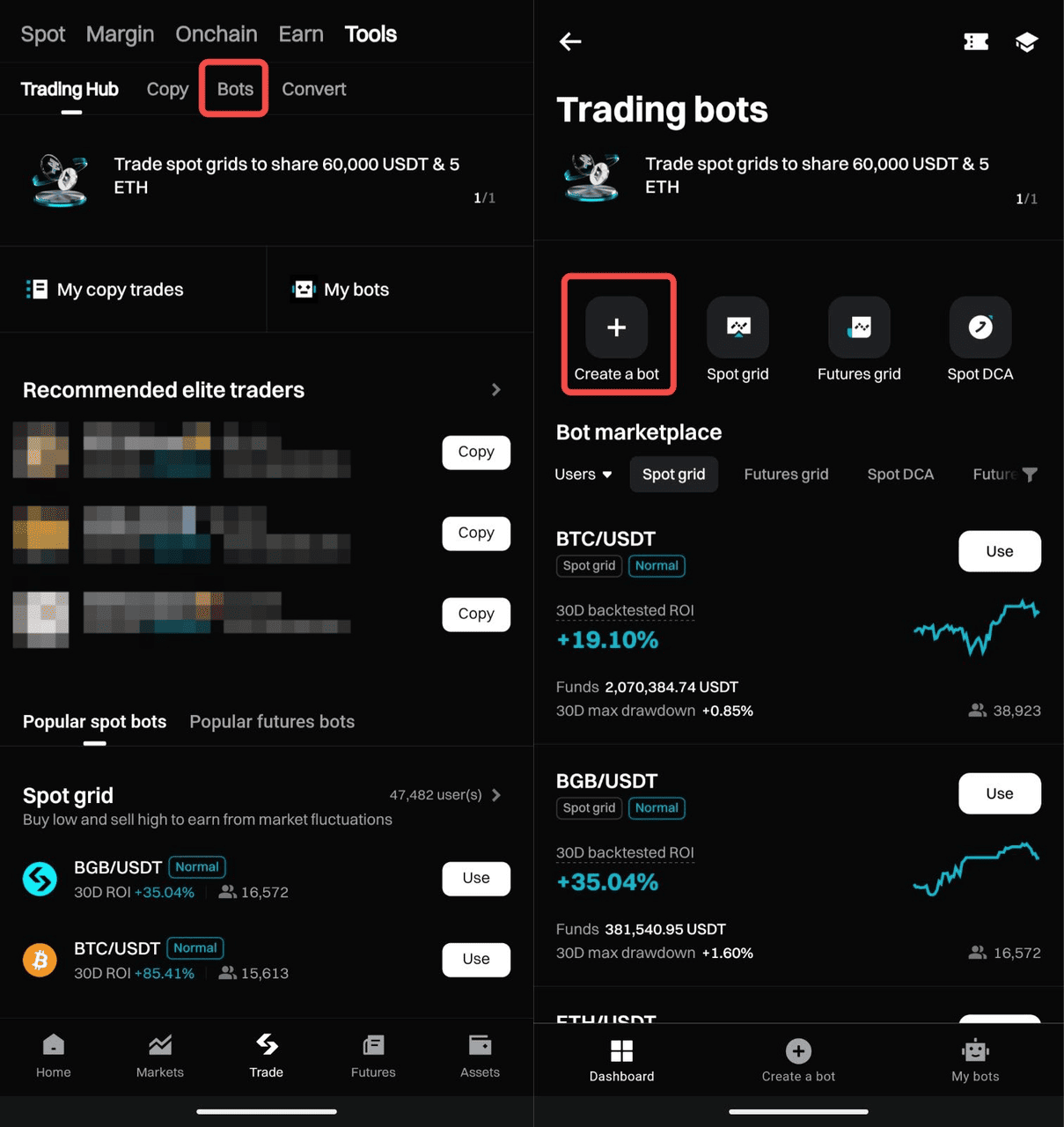
1. From the bottom navigation bar, tap Trade.
2. At the top of the screen, tap Tools.

Step 2: Open the bot trading menu
1. In the Tools menu, tap the Bots tab.
2. Tap Create a bot from the top of the Bots section.
3. Browse the available bot strategies and select Funding Rate Arbitrage.
Step 3: Customize your bot settings
1. Tap the trading pair at the top of the screen (e.g., BTC/USDT).
2. Choose your arbitrage strategy based on market conditions:
-
Positive arbitrage Use this when the funding rate is positive. The bot shorts perpetual contracts and buys spot assets to hedge price risk and collect funding fees.
-
If investing with USDT/USDC, the bot buys spot assets and uses them as margin. After the bot ends, you can sell or hold the assets.
-
If investing with the token, it’s directly used as margin and returned when the bot stops.
-
-
Negative arbitrage Use this when the funding rate is negative. The bot longs perpetual contracts and sells spot assets to hedge risk while collecting funding fees.
-
Only supports investment with the token. The bot sells your token for margin, then repurchases it after termination.
-
3. Review key data before launching:
-
Funding rate
-
Basis rate
-
Estimated arbitrage APR for the past 3, 30, and 90 days
4. Tap the chart icon beside the basis rate to explore historical trends.
Step 4: Set the Investment Amount
1. Enter the total amount of USDT/token to allocate for arbitrage.
Step 5: Adjust Advanced Settings (Optional)
1. Place orders in batches
-
Define a batch size to split orders for smoother trade execution, especially in volatile markets.
2. Sell at termination
-
Enable this option to automatically convert holdings to USDT when the bot stops.
3. Entry and exit basis rate settings
Use these to control when the bot starts and stops based on the market basis rate.
Entry basis rate
-
Defines when the bot should start based on price differences.
-
A higher rate suggests better arbitrage potential.
-
Positive arbitrage: (Contract entry average price – Spot purchase average price) / Spot price × 100%
-
Negative arbitrage: (Spot sale average price – Contract entry average price) / Contract price × 100%
-
-
The bot will auto-start once the market meets your target entry basis rate. You can also launch it manually anytime.
Exit basis rate
-
Sets the profit threshold to automatically terminate the bot once a target spread is reached.
-
A higher rate may indicate a more profitable exit.
-
Positive arbitrage: (Spot sale average price – Contract exit average price) / Contract price × 100%
-
Negative arbitrage: (Contract exit average price – Spot purchase average price) / Spot price × 100%
-
Step 6: Review and Activate
1. Double-check all settings, including coin selection, allocation, and frequency.
2. Tap Create order to activate the bot.
Step 7: Terminate the Bot (If Needed)
1. Go to "My Bots" dashboard.
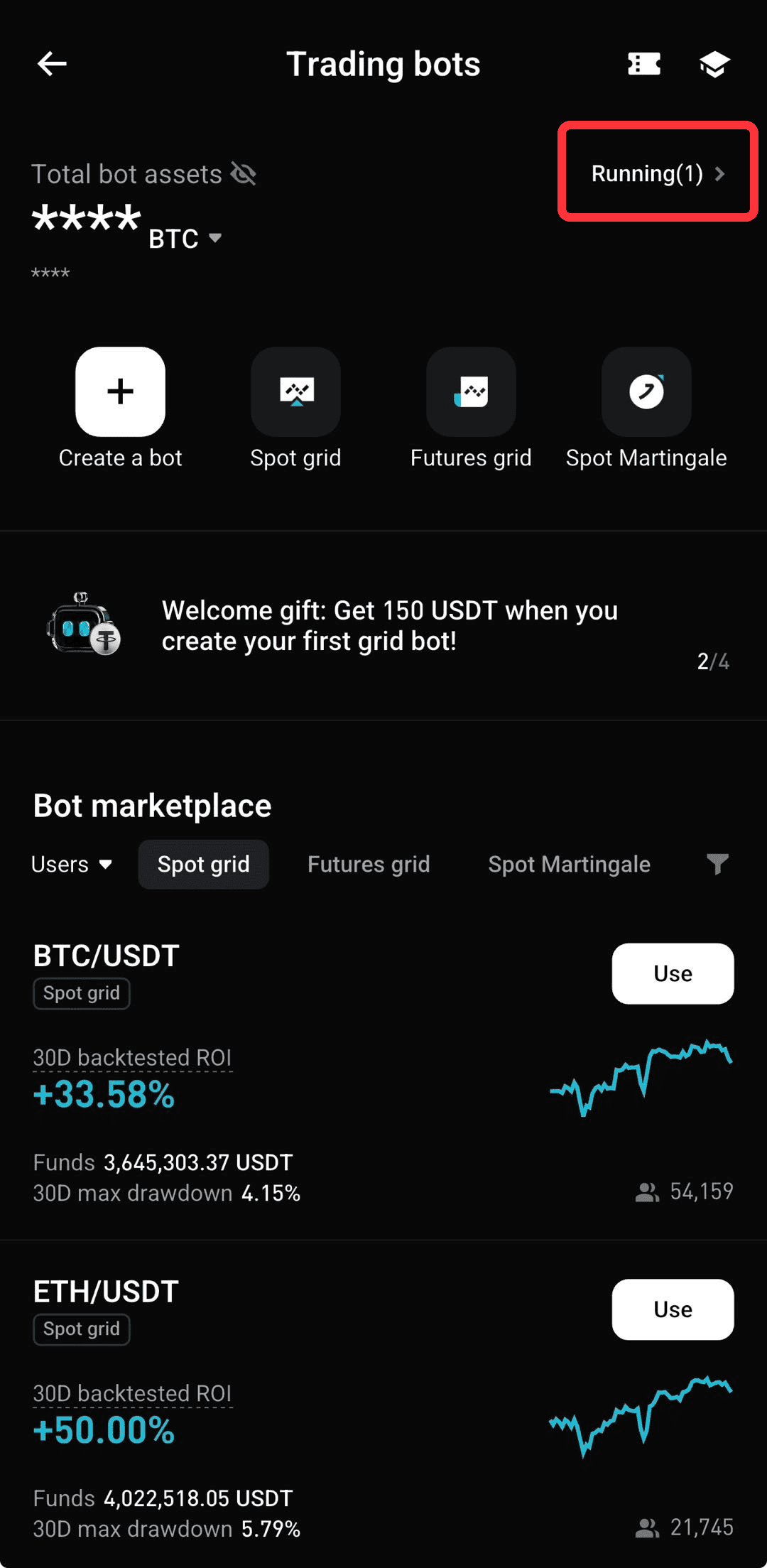
2. Select the bot you want to stop.
3. Tap "Termination" and confirm.
4. Once terminated, all open positions will be closed automatically at market price, and any remaining funds will be returned to your account.
FAQs
1. What is the Funding Rate Arbitrage Bot?
It’s an automated tool that captures funding rate payments by holding opposite positions in the spot and futures markets—such as buying spot and shorting futures, or selling spot and going long on futures.
2. What is the minimum investment required?
The minimum investment amount depends on the selected trading pair and is displayed as the "Required Margin" during setup.
3. Can I customize order placement?
Yes, the bot allows you to place orders in batches to reduce slippage.
4. Does the bot guarantee profits?
No, profits depend on favorable funding rates and market conditions. Past performance does not guarantee future returns.
5. What happens if I stop the bot?
If the "Sell at Termination" option is enabled, all positions will be closed and converted to USDT.
6. Why is there a small difference between spot and futures position sizes in trade history?
To hedge risk, the strategy keeps spot and futures positions aligned. If futures can't fully open due to precision limits, a small spot-only trade (single-leg) is triggered to balance positions. These single-leg adjustments may not be fully shown in the trade history yet, causing slight differences.
Disclaimer and Risk Warning
All trading tutorials provided by Bitget are for educational purposes only and should not be considered financial advice. The strategies and examples shared are for illustrative purposes and may not reflect actual market conditions. Cryptocurrency trading involves significant risks, including the potential loss of your funds. Past performance does not guarantee future results. Always conduct thorough research, understand the risks involved. Bitget is not responsible for any trading decisions made by users.
Join Bitget, the World's Leading Crypto Exchange and Web3 Company
Share